
- New
-
Computer peripherals
Category promotionsTop product
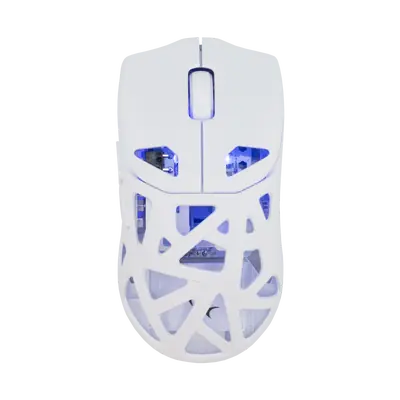 Code: DAGONET-W
White Shark MOUSE WGM-5019 DAGONET - White / Wireless
Pieces per carton: 40Pieces per pallet: 80031,92 €MPC: 39,90 €Shop by brand


-
Laptop accessories
Category promotionsTop product
 Code: ICE SHADOW
White Shark GCP-10 ICE SHADOW RGB Laptop Cooling Stand
Pieces per carton: 10Pieces per pallet: 12823,92 €MPC: 29,90 €Shop by brand
B2B API
Instructions for Connecting to the B2B Web Service
Below is a brief description of how to activate and use the Šmit Electronic B2B web service.
The B2B web service is intended for registered and approved B2B users and enables the retrieval of product, category, and availability data in XML and JSON formats.
User Account Activation
An active user account on the Šmit Electronic web shop is required in order to use the B2B web service.
If your user account has been created by the Šmit Electronic team, you will receive an e-mail with a link to set your password. Click the link to set your password and complete the activation of your user account.
If the link does not open, copy the address from the e-mail and paste it into your web browser.
After setting your password, log in to the web shop using your user credentials.
B2B API Access Activation
After logging in to the web shop, B2B API access must be activated within your user profile.
B2B API access is available at the following link:
https://smit-electronic.hr/en/b2b-api
If B2B API access has not yet been enabled for your user account, a message will be displayed on the page stating that access is not activated. To activate it, click the Enable B2B API access button.
After activation, you need to set a username and password for API access.
If you have previously used the B2B API, you may set the same access credentials again. Otherwise, set new credentials of your choice.
After entering the credentials, click Save.
Supported Formats
The B2B web service supports the following formats:
- XML
- JSON
Documentation
Please download and review the documentation before using the service.
The documentation will be updated whenever any changes to the service are made.
Using the Service
The documentation explains how to connect to the service programmatically, as well as how to call it via URL.
Available Endpoints
After B2B API access has been activated, endpoints for products, availability, and categories will be available.
Products
JSON endpoint:
/api/b2b/products
XML endpoint:
/api/b2b/products/xml
These endpoints are used to retrieve product data.
The data may include:
- recommended retail price;
- your purchase price;
- product images;
- product descriptions;
- product ID;
- group ID;
- product availability.
Availability / Product Stock
JSON endpoint:
/api/b2b/availability
XML endpoint:
/api/b2b/availability/xml
These endpoints display product availability.
We recommend retrieving availability data automatically at least once per day.
Categories
JSON endpoint:
/api/b2b/categories
XML endpoint:
/api/b2b/categories/xml
These endpoints are used to retrieve product groups/categories and to make it easier to map our product groups to your own groups.
Access Credentials
API access credentials are required in order to use the service. These credentials are set within the user profile after B2B API access has been activated.
Access to the service is available only to registered and approved B2B users.
Contact
For any additional questions or issues with connecting to the B2B web service, please contact us by e-mail: